Brand Identity Checklist: What Every Startup Brand Kit Should Include
A practical brand identity checklist for founders: the logo files, colours, type, voice, templates and brand guidelines every startup brand kit needs.
 Eric Boluwatife
2 June 2026 · 7 min read · Updated 31 October 2026
Why nowFrom designing the Montra, Worthwise and Leadpilot identities before building their sites.
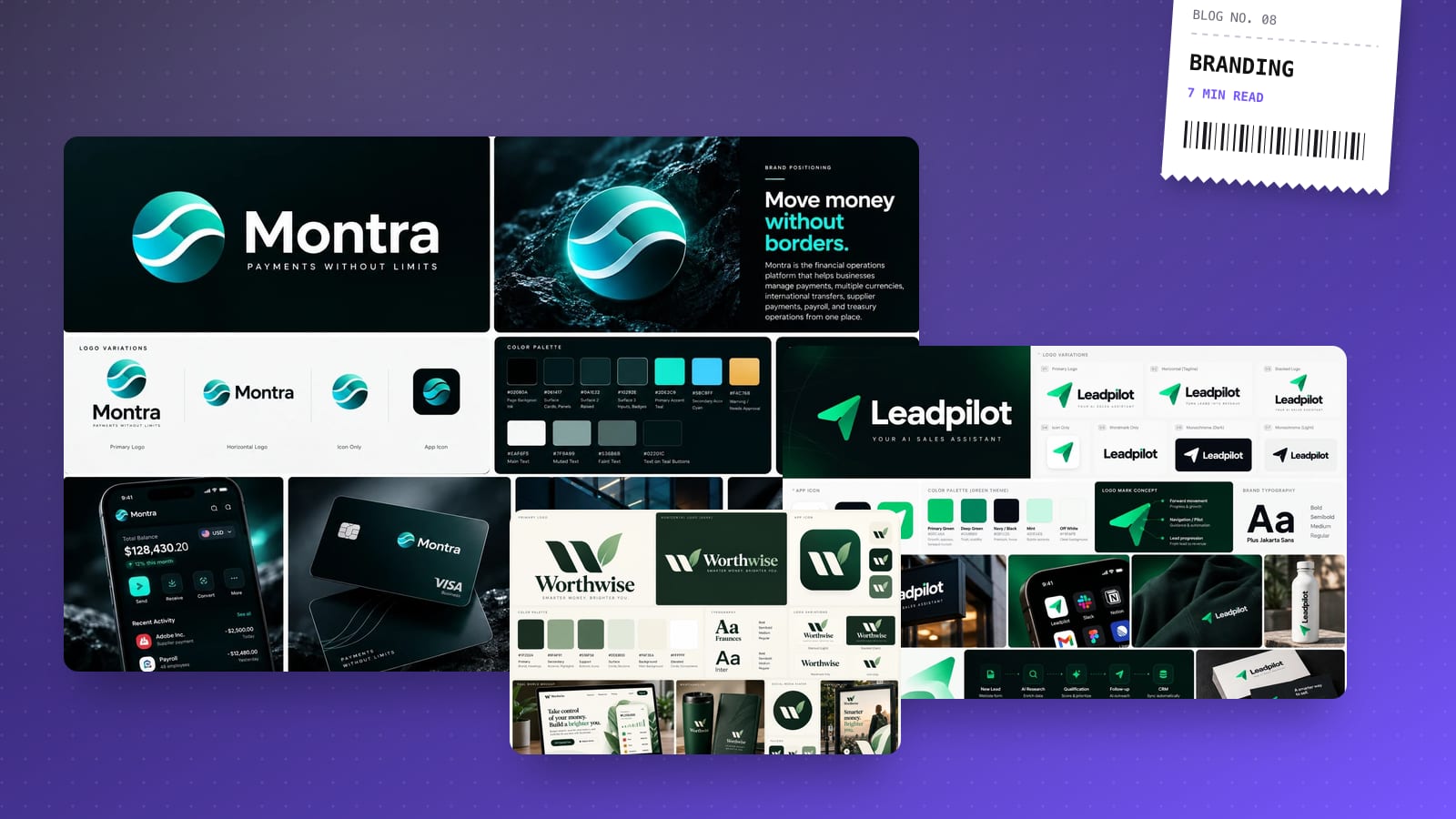
A startup brand kit should include a logo system in every format you need, a colour palette with exact values, a type system, rules for imagery and graphic elements, a short guide to your voice, and ready-made templates, all tied together by a brand guidelines document. The test is simple: if a new designer, developer or freelancer can produce on-brand work using only your kit, it's finished. If they have to message you for the "real" logo file, it isn't.
I design brand identities and the websites they live on, so I see both ends of the problem. Below is the checklist I work through on every identity project, in the order I'd tackle it.
Why does this matter more than a great logo? Most founders start with a logo and stop there. Then the pitch deck uses one shade of blue, the website another and Instagram a third. Nobody did anything wrong. There just wasn't a single source of truth.
A brand kit fixes that. It gives everyone who touches your brand (you, your team, agencies, printers, the developer building your site) the same files and the same rules. Over time, that consistency is what makes a young company look established and trustworthy.
It also saves money. Every time someone has to recreate an asset or guess a colour, you pay for it in hours, revisions or a slightly-off result that quietly erodes trust.
1. Strategy foundations: the page before the logo
Before any visual work, write down the thinking the visuals should express. This doesn't need to be a 40-page strategy deck. One or two pages is plenty.
- Positioning statement: who you serve, what you do for them and why you're different, in one or two sentences.
- Audience: the two or three types of customer you most want to attract, and what they care about.
- Personality: three to five adjectives, each with a "this, not that" (for example, confident, not arrogant).
- Competitor snapshot: how the main alternatives look and sound, so you can deliberately stand apart.
- Name and tagline: final spelling, capitalisation and how the tagline should and shouldn't be used.
Every design decision later should trace back to this page. When a debate starts over "which logo feels right", this is how you settle it.
2. The logo system
One logo is not enough. You need a small family of marks that work at every size and on every background.
- Primary logo: the full version for your website header, deck covers and signage.
- Secondary or stacked version: for square or narrow spaces.
- Icon or mark: the symbol on its own, for favicons, app icons and social avatars.
- Wordmark: the name set in type, if it differs from the primary logo.
- Colour variations: full colour, one colour, black, and white (reversed) for dark backgrounds.
- Clear space and minimum size: how much breathing room the logo needs and how small it can go before it breaks.
- Misuse examples: stretched, recoloured, outlined, placed on busy photos. Showing what not to do prevents most mistakes.
Logo file formats
This is where kits usually fall short. Ask for every version in these formats:
| File | Use it for |
|---|---|
| SVG | Websites, apps and anything digital that needs to stay sharp at any size |
| PNG (transparent) | Documents, slides, email signatures and quick social posts |
| PDF or EPS | Printers, signage and merchandise suppliers |
| ICO / small PNGs | Favicon (16 and 32 px), Apple touch icon (180 px) and app icons (512 px) |
Also ask for a social avatar crop: the icon centred in a circle-safe square, because most platforms crop profile pictures to a circle.
3. Colour palette
A palette is more than a few swatches you like. It's a system that tells people which colour to use where.
- Primary colours: usually one or two that people will associate with you.
- Secondary and accent colours: for highlights, buttons, charts and illustrations.
- Neutrals: your blacks, greys, off-whites and backgrounds. These do most of the work on a website.
- Functional colours: success, warning and error states for your product or forms.
- Exact values: HEX and RGB for screens, CMYK for print, and Pantone if you'll print merchandise.
- Approved pairings: which text colours work on which backgrounds, checked for contrast. For body text, aim for at least the WCAG AA ratio of 4.5:1.
- Proportions: a rough guide to how much of each colour to use, so the accent doesn't take over.
If you have a web product, ask for the palette as design tokens (named variables like brand-primary or surface-muted) so your developer can plug it straight into code.
4. Typography
Type carries a surprising amount of personality, and it's the easiest thing to get inconsistent.
- Heading and body typefaces, with the specific weights you use.
- Licences: confirm you're allowed to use each font on the web, in apps and on desktop. Free fonts from Google Fonts are a safe default; paid fonts need the right licence for each use.
- Fallback fonts for email, Google Docs and PowerPoint, where custom fonts often won't load.
- A type scale: sizes for H1 to H6, body, small text and captions, with line heights.
- Usage rules: sentence case or title case for headings, how to treat numbers and when (if ever) to use all caps.
5. Imagery, icons and graphic elements
This is what makes a brand recognisable even without the logo in view.
- Photography style: real people or product shots, natural or styled light, colour treatment, and examples of good and bad images.
- Illustration style, if you use illustration at all.
- Icon style: line or filled, stroke weight and corner style, ideally from one consistent set.
- Graphic elements: shapes, patterns, textures or a signature motif drawn from the logo.
- Motion principles if you're a digital product: how things animate, how fast and with what feel.
6. Voice and messaging
Visuals get attention; words do the persuading. A short voice guide stops your website, emails and captions sounding like they came from three different companies.
- Tone of voice: how your personality adjectives show up in writing, with before-and-after examples.
- Words to use and avoid: product names, jargon you've banned, how you refer to customers.
- Boilerplate copy: a one-line description, plus 50-word and 100-word versions for press, directories and partner pages.
- Elevator pitch and key messages: the three or four points you want every customer to remember.
7. Templates and real-world applications
This is the part of a brand kit people actually open every week. Ask for templates in the tools your team already uses.
- Social media templates: post, story and cover formats for the platforms you're active on.
- Pitch deck template with title, section, content, chart and closing slides.
- Email signature in HTML.
- Business card, letterhead and invoice layouts.
- Open Graph image template for link previews when people share your pages.
- Website-ready asset kit: optimised logos, favicon set, colour tokens and font files ready for the build.
That last point is why I prefer doing brand and website together. An identity designed in isolation often falls apart on screen: logos too detailed for a mobile header, colours that fail contrast checks, fonts with no web licence. When the same person designs the identity and builds the website, those problems are solved before they appear.
8. Brand guidelines and file handover
Finally, everything above gets bound into a brand guidelines document. For a startup, a focused PDF that someone can read in ten minutes beats a beautiful 80-page book nobody opens.
Good guidelines include:
- A short brand story and the positioning statement.
- Logo usage, colour, typography, imagery and voice rules, each with do and don't examples.
- Links to where every file lives.
And the handover itself matters:
- One shared folder you own (Google Drive, Dropbox or similar), not a link in a freelancer's account.
- Clear structure:
Logo / Colours / Fonts / Templates / Guidelines, with descriptive file names. - Editable source files (Figma, Illustrator or similar) as well as exports.
- A version date on the guidelines, so people know which copy is current.
Common mistakes to avoid
- Getting only a PNG logo with a white background.
- Choosing colours that look good together but fail contrast as text.
- Using a font you don't have a licence for on your website.
- Skipping templates, so everyone improvises in Canva.
- Storing the kit somewhere only the designer can access.
If you're planning a launch, pair this checklist with a page built to convert. My guide to landing page design that converts covers that side.
For examples of a full kit in use, see the identity I made for the podcast Fireplace Chit-Chat and the brand behind the concept finance app Worthwise: logo, colour, type and the rules that hold them together across every screen.
If you're starting a company or getting ready to rebrand, book a 30-minute call. I'll ask about your audience and goals, then send a fixed-price proposal within a day.